
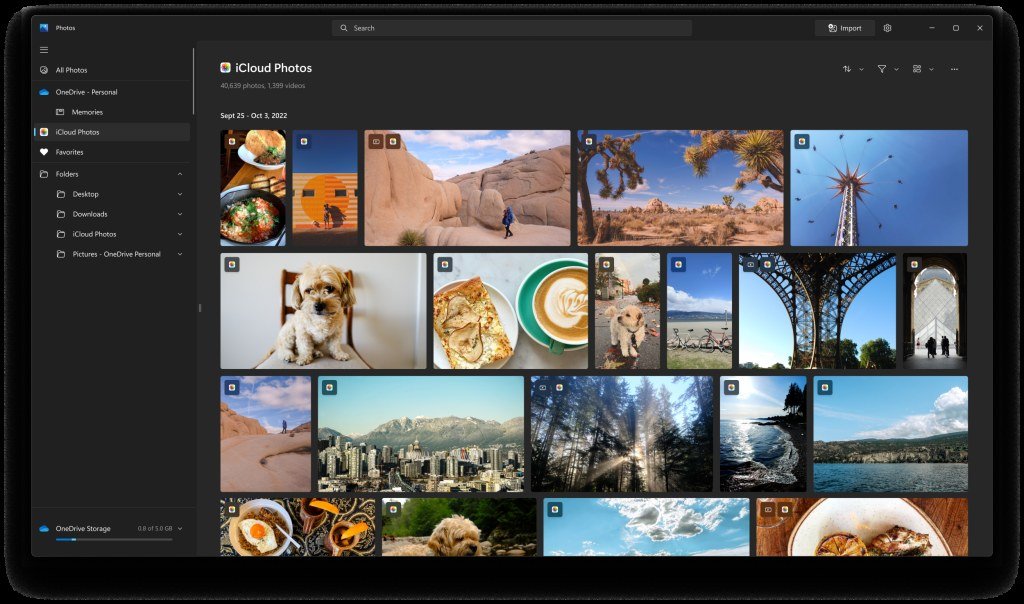


Microsoft has begun a large-scale rollout of updates aimed at fixing some of Windows 11’s longest-standing complaints, headlined by a redesigned Photos app and meaningful performance gains across the operating system. The company claims Windows 11 is now up to 20 per cent more responsive across core features, including the Edge web browser.
The overhaul touches memory management, app launch times, Bluetooth reliability and driver quality, alongside a rebuilt Photos experience. The new Photos app is rolling out to Windows Insiders first, with a broader release for all Windows 11 users planned later this year.
Windows 11 Performance: Up to 20 Per Cent More Responsive
Performance is the centrepiece of the update. Microsoft says a large part of the improvement comes from better use of system resources and RAM. On PCs with 8GB of memory, Windows 11 can now keep up to 2GB more active data in memory instead of moving it to slower storage, helping the system stay responsive with more apps and browser tabs open.
Background RAM use is also being trimmed. On PCs with 8GB of memory or less, widgets now load only when opened, reducing background workload by 200MB. The result, Microsoft claims, is a noticeably nippier feel on the budget and mid-range machines where Windows 11 has often felt heaviest.
Reliability is also in focus, with faster and more consistent connections for Bluetooth headphones and a joint effort with hardware makers to refine driver quality. These are the kinds of unglamorous fixes that shape everyday impressions of Windows 11 more than any single headline feature.
Windows 11 Photos App: Rebuilt Gallery, Editor and Viewer
The Photos app is the most visible change. Microsoft has rebuilt the native photo editor around WinUI 3, its modern interface framework, and says it now launches 25 per cent faster than before. The editor groups tools into four categories — Crop, Repair, Enhance and Stylise — and adds repair for removing unwanted objects and relight for adjusting a photo’s lighting.
The redesigned viewer launches about 15 per cent faster on average and opens photos up to 30 per cent faster, with a cleaner layout that puts the image centre stage. The new gallery unifies photos stored on the PC, OneDrive and Apple iCloud in a single view, with better scrolling performance and natural-language search — users can type a phrase like “pictures of my dog on the beach” to find a shot.
The editor also adds native support for HEIC, the iPhone’s usual format, and Google’s WebP, along with HDR editing that preserves colour and contrast. Editing HDR photos taken on an iPhone will no longer degrade their colour and contrast, a long-standing frustration for mobile photographers. New filters can narrow photos to the people in shot or the service storing them, and everyday actions like sharing and printing sit within easy reach.
Natural-language search is the gallery’s other standout trick. Instead of remembering dates or folder names, users can describe a memory in plain words and let the app surface it — a small change that could reshape how large photo libraries get browsed.
Windows 11 Rollout: What Happens Next
“Our focus is simple: help you rediscover and organise your collection, give you more capable tools for your favourite shots, and make the everyday experience faster,” said Giorgio Sardo, Vice President, Microsoft Store and Windows Apps, describing the Photos revamp.
For users, the practical takeaway is patience: the updates begin with Windows Insiders before reaching everyone later this year. Those on 8GB machines stand to gain the most from the memory improvements, while photographers will welcome an editor that finally handles modern formats without workarounds.
Microsoft has spent the past year steadily reworking the operating system, from the Start menu and taskbar to faster, more efficient search. This overhaul continues that pattern: less about new tricks, more about making it feel as fast as it should have from the start.